Subscribe:
Showing posts with label Chat Clients. Show all posts

Monday, 7 April 2014

How to set up Video Chat in Facebook

Video chat facility on Facebook powered by Skype is now available to use. You can easily install and intergrate Facebook video chat option in your Facebook account.

To do so, follow these simple steps given below:

  • Go to this URL, and click on get started.
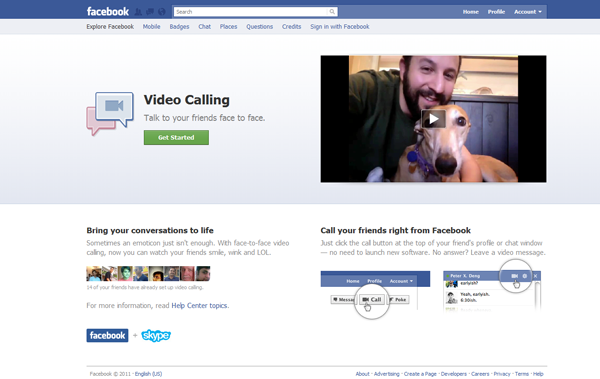

  • Suddenly your Chat interface will be changed and it will prompt your to set up few things.
  • Now click on Cam symbol appearing on chat window of  any of your friend.
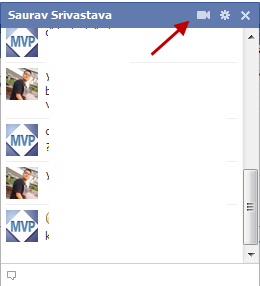

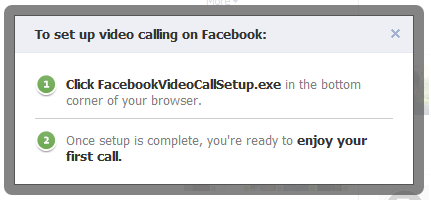
  • A notification will appear and guide you to download the facebookvideochat.exe plugin on your computer.

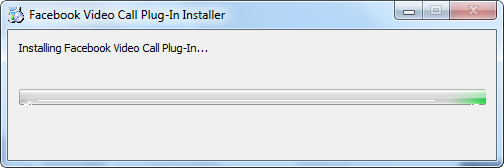
  • Now wait until the plugin will get installed.

  • And its all done now, click on the Cam symbol to make a video call.
  • Once your friend will answer the call, you will start seeing each other.

It’s all done! Now enjoy the video calling with your Facebook friends and family easily.

How To Add Facebook Like Box In Blogger Blog


When you start your Facebook page you ask your friends and family members to like it and after that it all depends upon the content you write. If people like your content they will voluntary like your Facebook page. But still you need to provide them with an easy method of doing this. Facebook like box allows your visitors to join you easily and they don't have to find you manually. Facebook developers have made this thing very easy to integrate a Facebook like box in to your Blog by adding a few lines of code in it. No let us take a look at the steps you need to follow.


How To Add Facebook Like Box In Blogger Blog.
  • This process includes the editing of your Blog's template, so it is recommended to take a backup of your Blog. First click on the template from your Blogger Dashboard. Then click on Backup/Restore and download the template from the pop-up window.
  • Now that you have taken the backup, you are ready for the process. Visit the FacebookDevelopers.
  • You will see a window like the one shown below.


  • Customize the look and feel, height, width of your Like box from this window.
  • Uncheck the show stream if you don't want the latest posts with this widget.
  • Uncheck the header checkbox if you don't want to display "Find us on Facebook".
  • Once you are done with the customization, click on Get code. It would pop-up a window like the one shown below.


  • Click on Edit template from the Blogger dashboard. Copy the code 1 from the above window and paste it just after the <body> tag.
  • Now save the template and click the Layout button.
  • Click on add a gadget from your sidebar. Add HTML/JavaScript gadget and Paste the code 2 in it.
  • Now you are done. Save the arrangement and click on View Blog.

  • You just added a Facebook like Box in your Blog. If you need any help you can comment here. You should also see other Blogging and SEOtips on Unziptech, it will help you improve your Blogging experience.
  • If you like my work; you can show your regards by hitting Facebook like button, following us on Google+ or Twitter, stumbling our posts on stumble upon or giving us a link back via the links below. Stay tuned for more tech updates.

Wednesday, 19 March 2014

Nymgo

Nymgo-Screenshot
Nymgo is a softphone for making calls and take your time.Just a great quality phone service and incredibly low international call charges to landlines and mobiles.

You always know where you stand with Nymgo. You get a great quality of service, backed by our Fair Pricing and Every Day Low Pricing policies. We don't offer you fancy promotions that promise the earth but in reality deliver nothing. There are no connection charges with Nymgo. No calling credit expiry dates with our Pay As You Go service. And definitely no harnessing the processing power of your computer to enable our network to run faster. We give it to you straight, including some great value adds – such as the ability to record your conversations, low cost texting and access the same phone book from wherever you happen to be at the time; at home, around the corner or on the other side of the world. You pay the advertised Pay As You Go price with Nymgo. And that's all you pay. We don't tie you up in long term contracts, either. You can cancel either service at any time, without incurring any penalty charges. Simply use up your credits and don't top up again, or cancel your direct debit or credit card payment. We hope you don't, of course. But you're free to do exactly that, if you so decide.
 
“Nymgo is a software that  enables you to makes calls from PC to Landlines and mobile phones over the Internet through VoIP.”
Features:
  • The highest quality and lowest rate calls from your PC to any mobile or land line in the world.
  • SMS text messaging.
  • Contact on smart map.
  • Friend finder and rate finder.
  • Rewarded with Hello Points for staying active on Nymgo.
  • Credit tracker.
  • App synchronizes address book contacts across devices
Call Rates:
Nymgo’s Call rates can be found online HERE
SMS Rates:
Nymgo’s SMS rates can be found online HERE
 
 
Requirements:
Win XP/Vista//Win 7
Download-Nymgo-For-Windows
Rating: 4.0/5 (1 vote cast)
Pc tricks
Powered by Conduit Mobile